Set aside for next month
Set aside income for next month on a transaction, as an income category's default, or from Ready to Budget, and budget a month ahead in Zerosum.
Written By Pedro
Last updated 1 day ago
Set aside income now and budget it next month instead of this month. There are three ways: on a transaction, as an income category's default, or from money already in Ready to Budget.
💡 It moves money, it doesn't create more. What you set aside leaves this month's Ready to Budget and arrives in next month's.
Turn it on
Open Settings > Budgeting (click your budget name in the sidebar, then Budget settings).
Turn on Set aside for next month and confirm with Turn on.
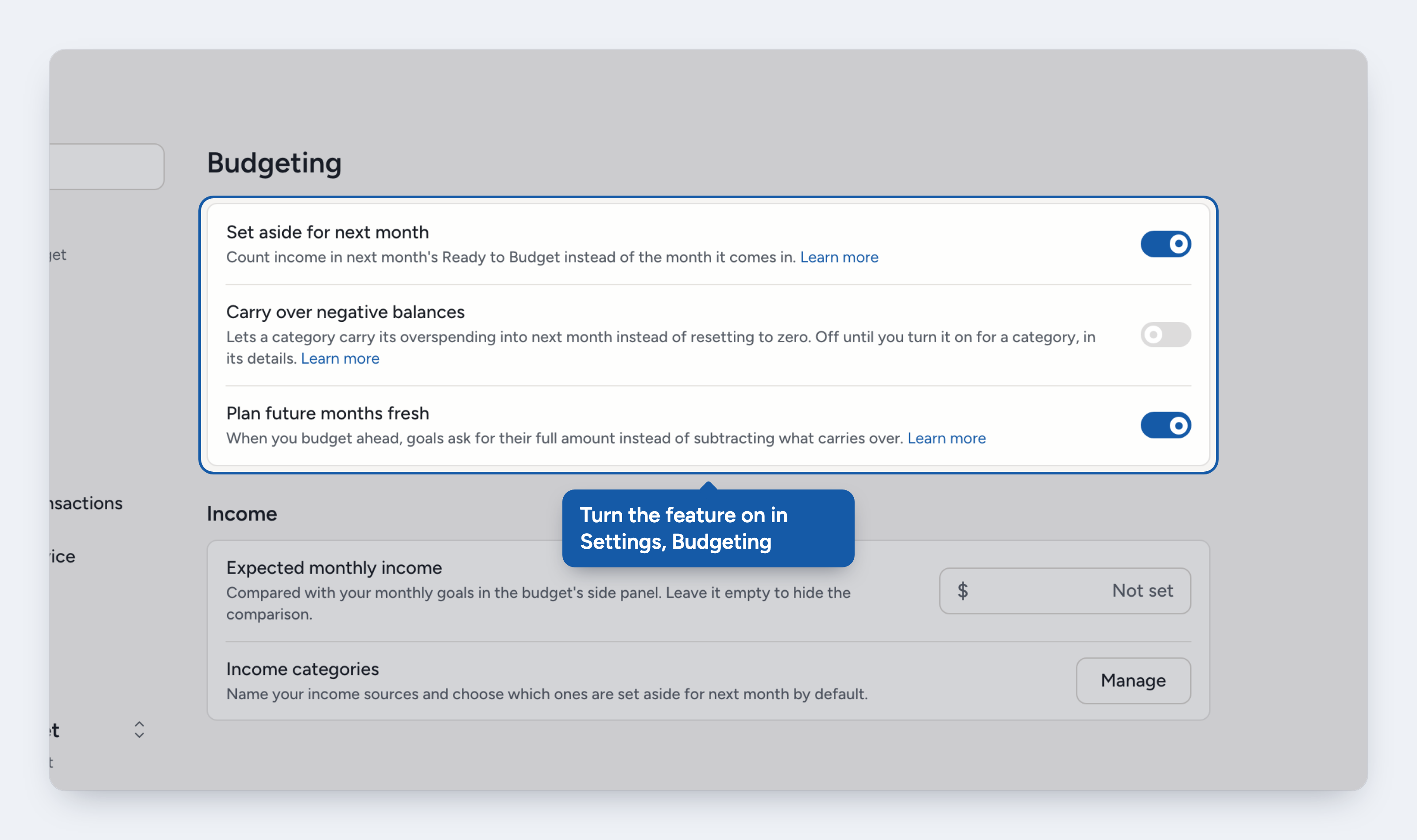
The setting applies to everyone in the budget. If income was already marked to be set aside, it moves to the following month right away.
Set aside a transaction
Add an income transaction, or open one to edit it.
Turn on Set aside for {next month} and save.
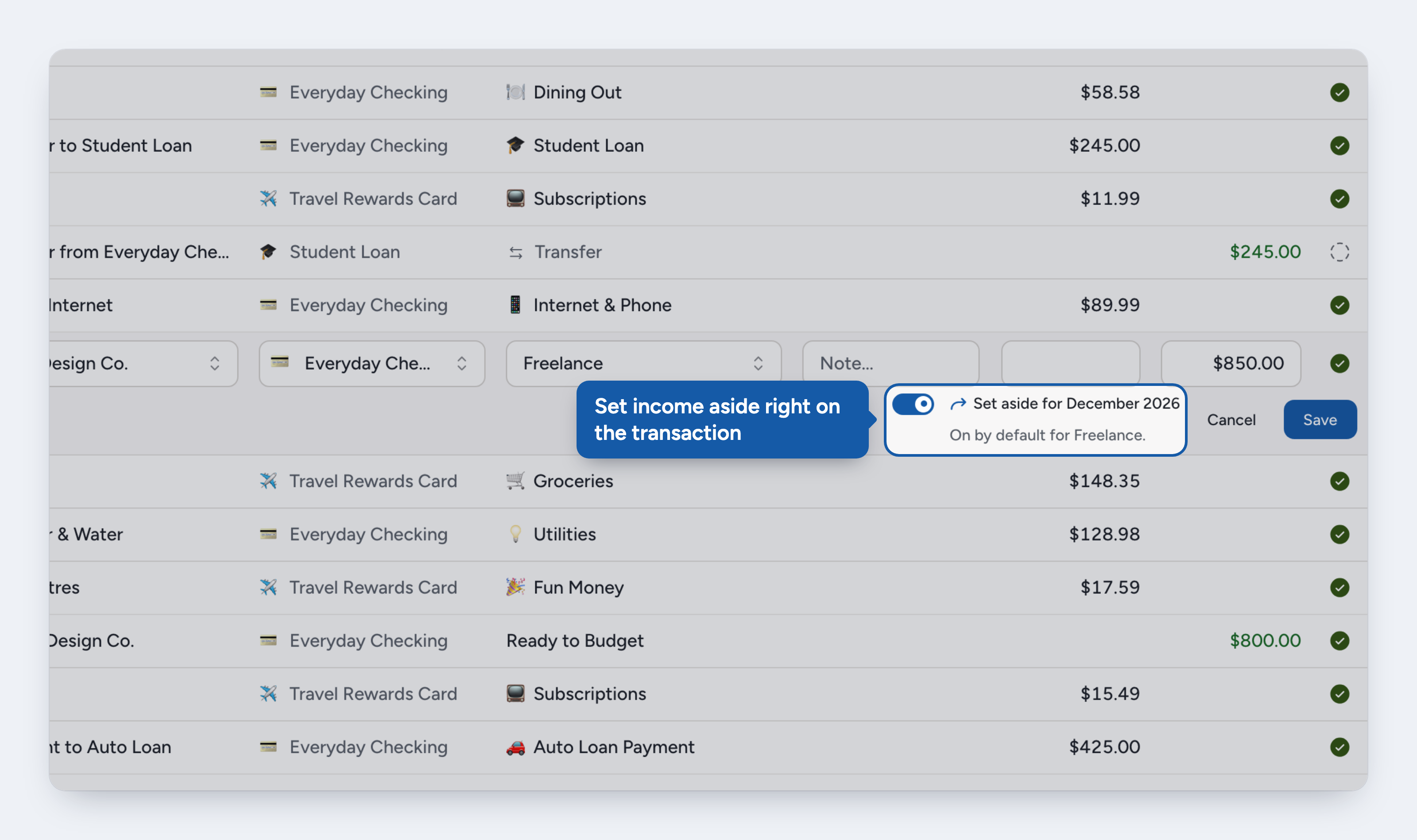
The switch appears for money coming in to an income category (Ready to Budget included) on a budget or credit card account. A note under it can say:
On by default for {category}. The category sets its income aside by default. You can still turn it off here.
Only the part above what the card owes is set aside. On a credit card, income pays the card first.
Also applies to later occurrences. On a future occurrence of a recurring transaction, your choice becomes the schedule's.
Good to know
Changing the category resets the switch to the new category's default. Changing only the amount keeps your choice.
Zerosum asks first when changing a category or payee from a list would turn set aside on or off.
Split lines have no switch. A line is set aside when its category sets income aside by default.
Transfers. Income from a tracking or loan account can be set aside. Money from a credit card can't.
Imported income follows its category's default.
Make it an income category's default
If a source of income always belongs to next month, such as a salary, make it the category's default.
Open Settings > Budgeting and select Manage next to Income categories.
Turn on Set aside by default for the category. Ready to Budget has the same switch.
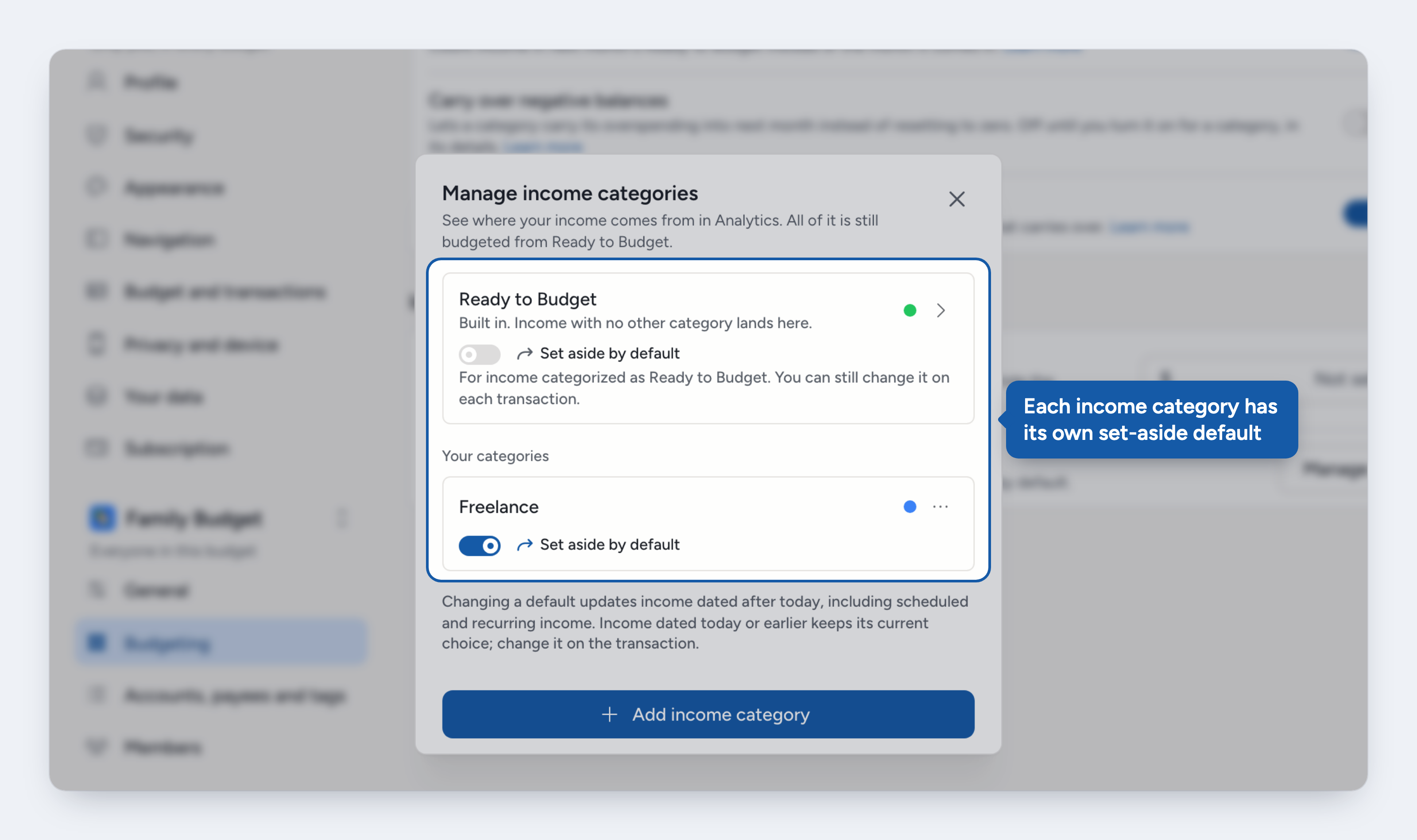
A new default applies to income dated after today, scheduled and recurring income included. Earlier income keeps its choice, which you can change on the transaction.
Set aside money from Ready to Budget
Money already in Ready to Budget can be set aside without touching a transaction.
Open the current month and select the Ready to Budget card. It needs to show money: at $0 there is nothing to set aside.
Under the budget form, Set aside for {next month} shows what next month already gets.
Select Set aside remaining {amount} to set aside everything Ready to Budget shows, in one click.
To choose an amount instead, select the Set aside for {next month} card, enter the amount From Ready to Budget and select Save changes.
On a phone, tap the set-aside button under Budget. Set aside remaining {amount} is in the editor it opens.
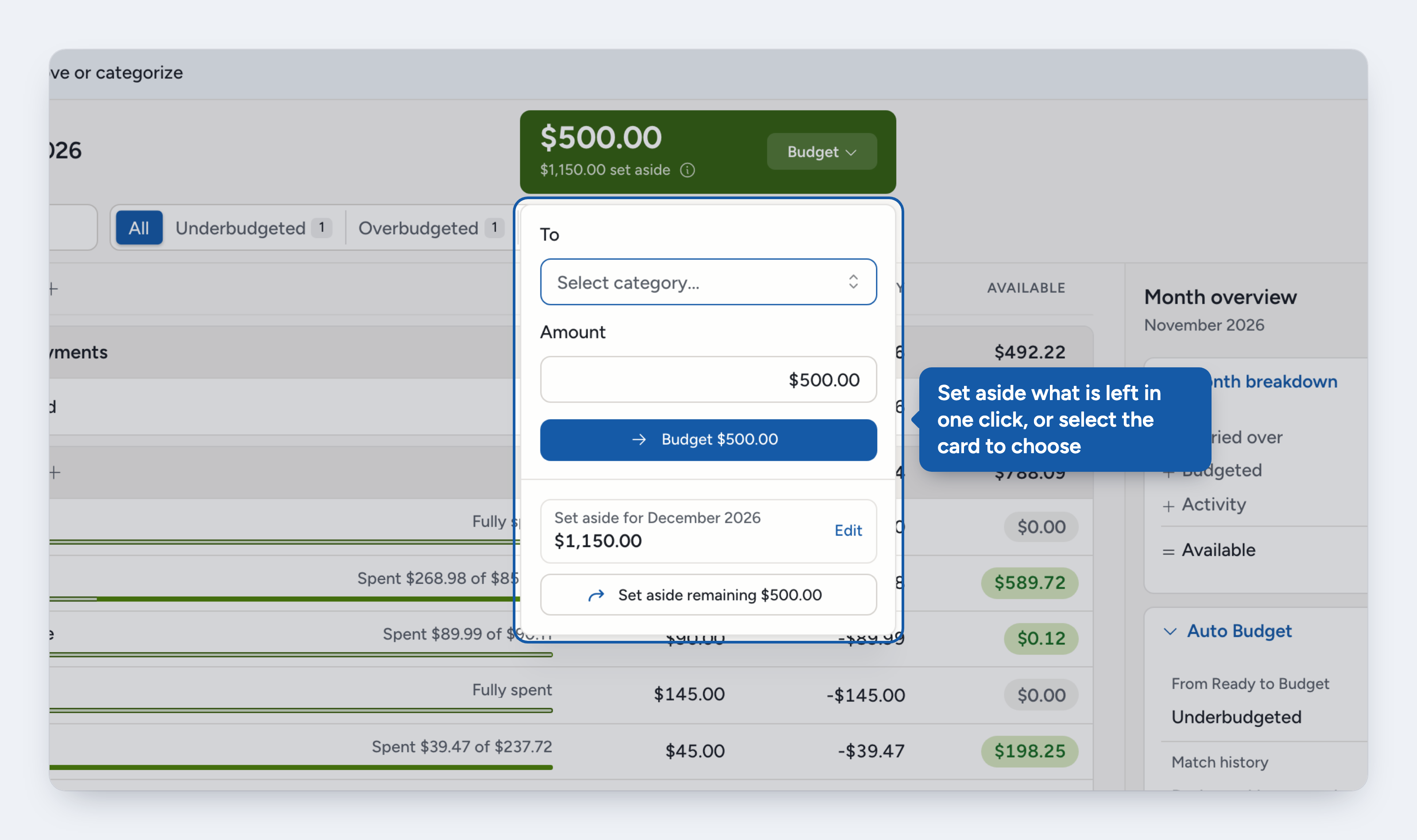
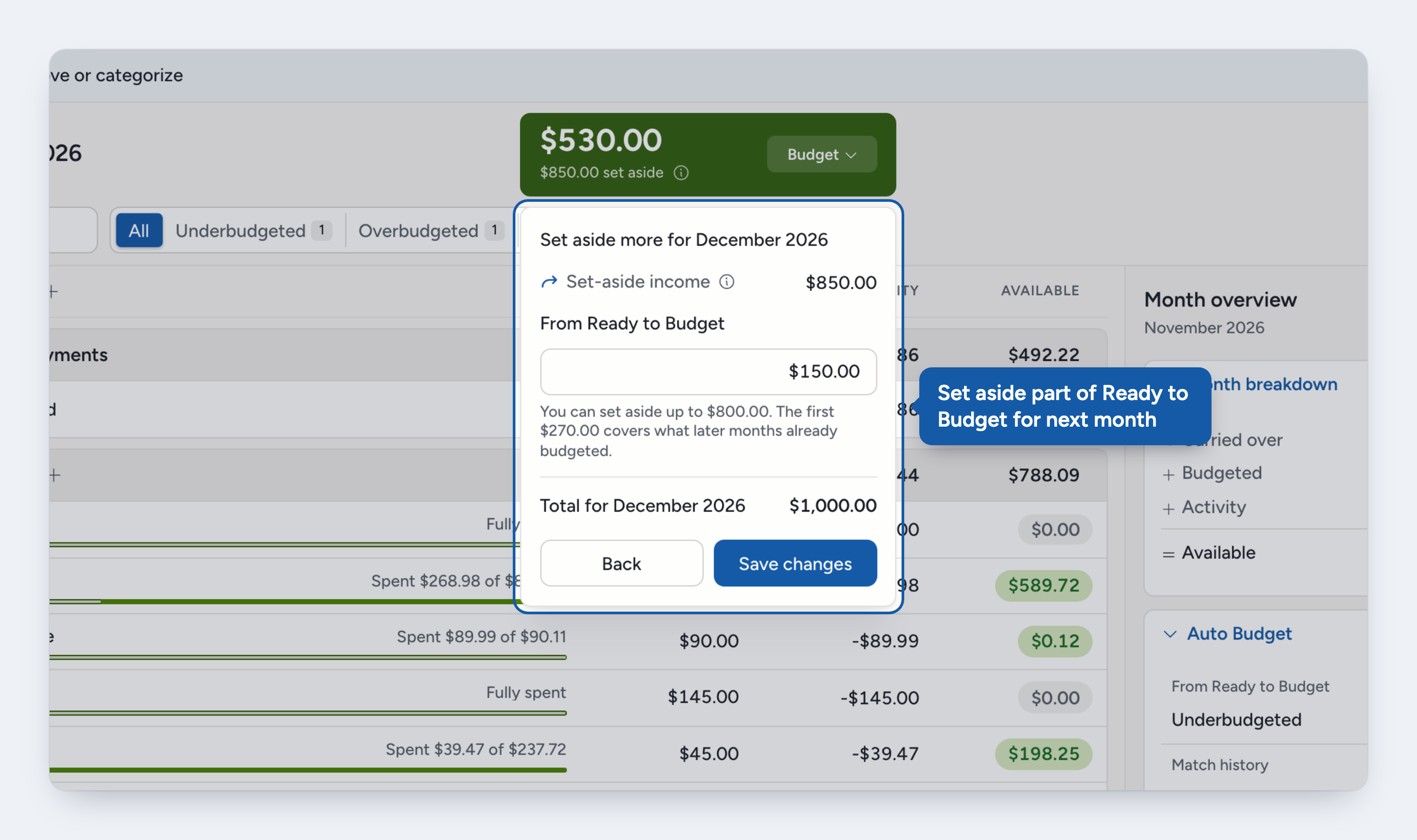
The amount is a total. Change $1,000 to $1,500 and $500 more is set aside. Lower it to release money back to this month.
Set-aside income is added for you. If this month's transactions already set income aside, the editor shows it above your amount and the Total for {next month} below. To change that income, edit its transactions.
Edit or release it
Select the Set aside for {next month} card on the same popover. When Ready to Budget is $0, the Ready to Budget card opens straight to it.
After a month ends, you can lower or clear its set-aside from that month's card, but not raise it.
If later months are already budgeted
Money you set aside pays for what later months already budgeted first. Say November has $800 left and December already budgeted $270 of it. Ready to Budget shows $530, and you can set aside up to $800. The first $270 covers December's budget, so Ready to Budget goes down only for the amount above that. Budget calculation shows the $270 as Budgeted or set aside in later months. Here the one-tap button reads Set aside the rest: it sets aside all $800, so the set-aside total goes up by more than Ready to Budget showed.
If the month is over-budgeted
When Ready to Budget is negative and you have set an amount aside from it, select Cover on the card:
Take {amount} back releases the shortfall in one tap.
The Set aside for {next month} card lets you choose another amount.
Or cover the shortfall from a category, as usual.
Where to see it
Transactions. An arrow icon beside the category. On desktop, hover it to see the month.
Ready to Budget card. Reads "$X set aside".
Budget calculation. The info icon on the card shows what this month set aside and what arrived from last month.
Export. The transactions CSV has a "Set Aside For" column.
Turning it off
Turn Set aside for next month off in Settings > Budgeting and confirm. While it's off, income counts in the month it arrives. Your choices and amounts are kept, so turning it back on restores everything. Earlier changes to amounts set aside from Ready to Budget can no longer be undone or redone.
ℹ️ Used the For Next Month category before? It is now a normal income category that is set aside by default. Rename it, change its default, archive it or delete it in Manage income categories.
Where to next
Was this helpful?