Get started with Zerosum
Set up your zero-based budget in 15 minutes. Add accounts, create categories, plan every dollar, and build a weekly reconcile rhythm.
Written By Pedro
Last updated 4 days ago
Set up a zero-based budget in about 15 minutes: add your accounts, create categories, plan every dollar, then track and reconcile.
1. Add your accounts
Start with the money you spend day to day. You can always add more later.
Add these
- Checking
- Savings
- Credit cards
- Cash, if you use it
Skip for now
- Retirement (401k, IRA): add later as a Tracking account
- HSA: add later as a Tracking account
- Active loans: add later as a Loan account
- Click Add account in the sidebar.
- Choose the account type and enter a name.
- Enter the current balance. For checking, savings, and cash accounts it goes straight to Ready to Budget. Credit-card and tracking balances are recorded as-is and do not add to Ready to Budget.
💡 Tip: Connect a bank for automatic import, or skip and add transactions manually. You can switch later.
2. Set up categories
Categories are where your money lives between getting paid and spending it.
- Answer a few questions: pick a lifestyle and we generate a full category list you can edit.
- Start from scratch: build your own when you already know what you want.
💡 Tip: Related categories can live under a group (Housing, Fun, Subscriptions). Groups collapse together, handy once you have more than ten categories.
3. Plan every dollar
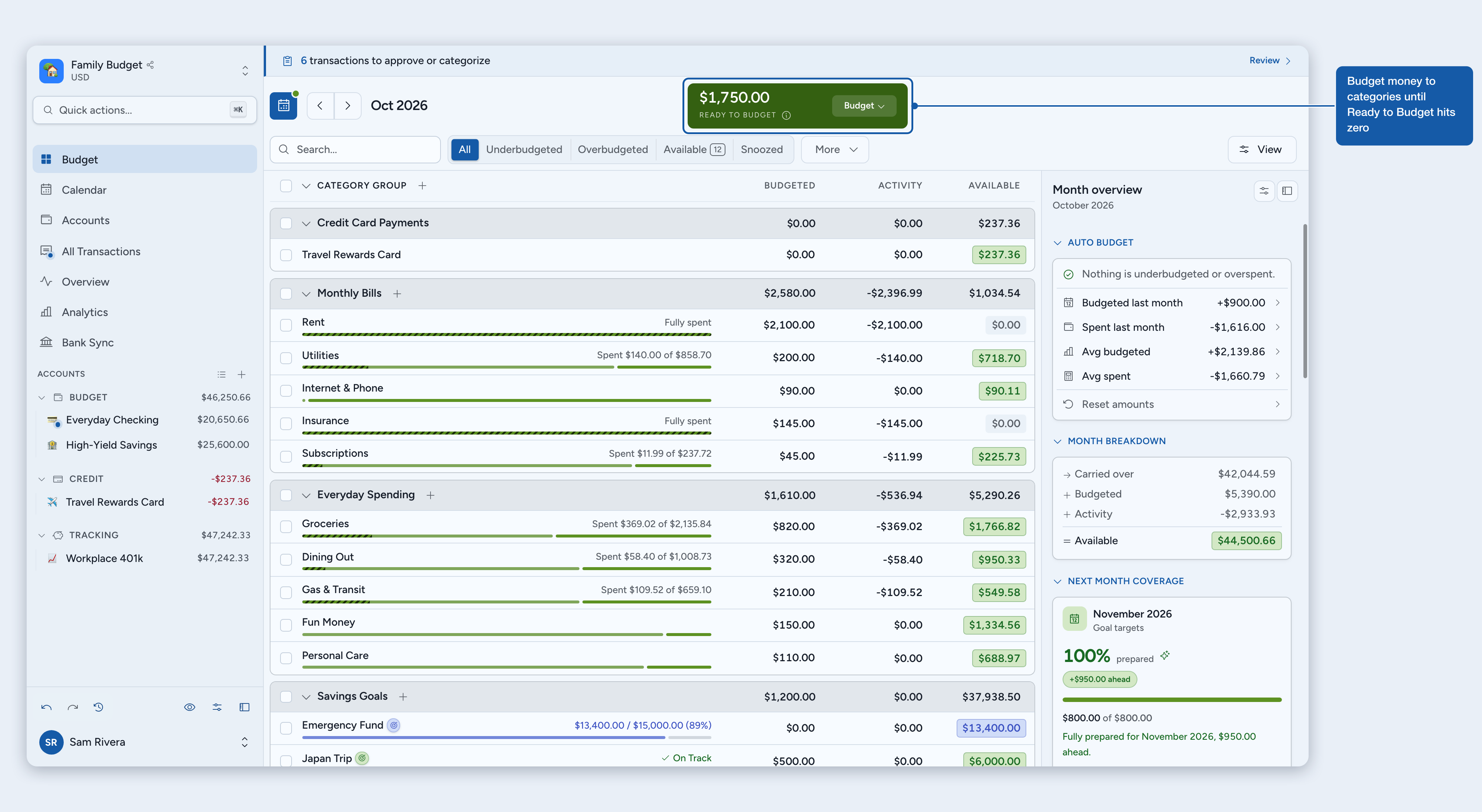
Budget your money to categories until Ready to Budget reaches zero. Click into a category and type how much it gets this month. Keep going until Ready to Budget hits $0.
ℹ️ Only budget money you already have. Don't pre-spend next week's paycheck.
4. Track and reconcile
Record what you spend, clear it against the bank, and lock in the month. Three ways to add transactions:
- Type it: add transactions manually. Fastest on mobile.
- Import a file: upload CSV, OFX, QFX, or QIF from your bank.
- Bank sync: connect once and transactions flow in automatically.
The rhythm: Budget income → Spend → Clear → Reconcile.
💡 Tip: Reconcile weekly to catch issues while they're fresh.
You're set
Every dollar has a plan. Keep the rhythm and you're done. Where to next?
- Goals: goal dates and amounts for what matters.
- Credit cards: two models; pick the one that fits how you use the card.
- Analytics: spending trends and net worth over time.
- Sharing: bring in your partner or family.
Was this helpful?
Still need help? Share an idea