Sharing & Collaboration
Share your budgets with a partner or family. Seats count across all of your budgets: 1 on Basic, 3 on Plus and 5 on Pro.
Written By Pedro
Last updated 4 days ago
Budget together with your partner or family. The budget owner invites others, who get full access at no extra cost.
How sharing works
Basic includes 1 seat, Plus includes 3, and Pro includes 5, shared across every budget you own. A seat is one person, not one budget; inviting the same person to multiple budgets uses just one seat.
ℹ️ Important: Inviting your partner to both your "Family" and "Kids" budgets uses one seat, not two. You can create unlimited budgets; the seat limit applies to your whole account (1 on Basic, 3 on Plus, 5 on Pro).
Owner: creates the budget, invites and removes members, and has a few owner-only actions (see below).
Members: full access to transactions, categories, accounts, goals, and analytics, and to most budget settings. Note that invited members are limited to the budget they were invited to and cannot create their own independent personal budgets unless they have their own active trial or subscription.
Inviting members
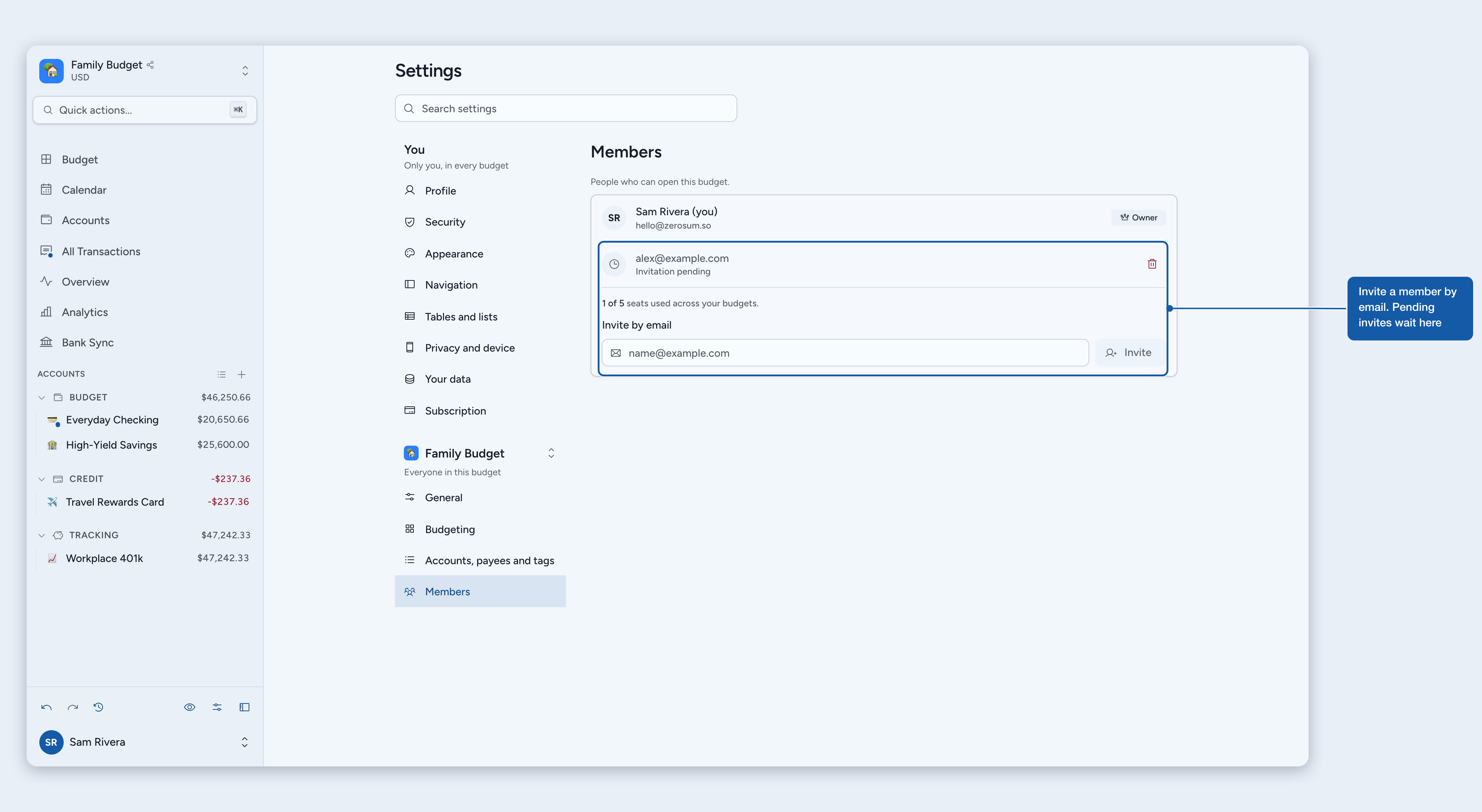
Open Members. Click the budget name in the sidebar, then select Members. This opens Settings > Members for the budget you are in. You can also open Manage budgets from the same menu and choose Members in a budget's row menu.
Enter their email. Type their email address under Invite by email and click Invite. Above the field you can see how many of your seats are used across your budgets.
They get access. Existing Zerosum users are added immediately. New users get access when they sign up with that email, no subscription needed.
What members can do
Full access: add transactions, manage categories and accounts, set goals, view analytics, and budget money.
Budget settings: members can change the budget's settings in Settings, such as the name, icon, currency, and formats under General and the options under Budgeting. Changes apply to everyone in the budget. Members can also use Export budget data.
Notifications: each person chooses whether the budget sends them review notifications, in Settings > Privacy and device > Notifications. The owner starts with them on, members with them off.
Owner-only actions: change the budget's time zone, duplicate the budget, start fresh, delete the budget, invite or remove members, link bank accounts to the budget's accounts, and download or restore its automatic backups.
💡 Tip: Members can also create their own separate budgets with their own subscription. Shared access works alongside personal budgets.
Managing members
Open Settings > Members to see who has access. The owner can remove a member or cancel a pending invitation from the same list; members see the list without those options.
Leaving a shared budget
Open Members. Click the budget name in the sidebar, then select Members.
Click Leave budget and confirm. You lose access immediately.
You can also leave from Manage budgets: open the shared budget's row menu and choose Leave.
ℹ️ Important: Leaving does not delete any data. The owner and other members keep everything as-is.
Common questions
Do members need their own subscription?
No. Once you are invited, you get full access without your own subscription. The owner's plan covers everyone in their seat allowance.
What happens if the owner downgrades to a plan with fewer seats?
Pro includes 5 seats, Plus includes 3, and Basic includes 1. If the new plan allows fewer members than you have, the oldest memberships are kept up to the new limit and the rest are removed automatically. The owner can re-invite anyone after upgrading again.
What happens if the owner cancels their subscription?
When the owner has no active subscription and their trial has ended, all members and pending invitations are removed after a 3-day grace period. Re-subscribing during that window keeps everything intact.
What happens if the owner deletes the budget?
All data is deleted and all members lose access. Only the owner can delete a shared budget.
Can I share multiple budgets?
Yes. Share as many budgets as you like; your account's total people limit still applies (1 on Basic, 3 on Plus, 5 on Pro). Inviting the same person to more than one of your budgets uses a single seat.
What if I'm out of seats?
Remove someone from all of your budgets to free a seat, then invite the new person. Adding an already-invited person to another of your budgets works even when every seat is occupied: same person, same seat.
Where to next
Was this helpful?
Still need help? Share an idea